
How to Avoid Geek Squad Scams: A Complete Guide
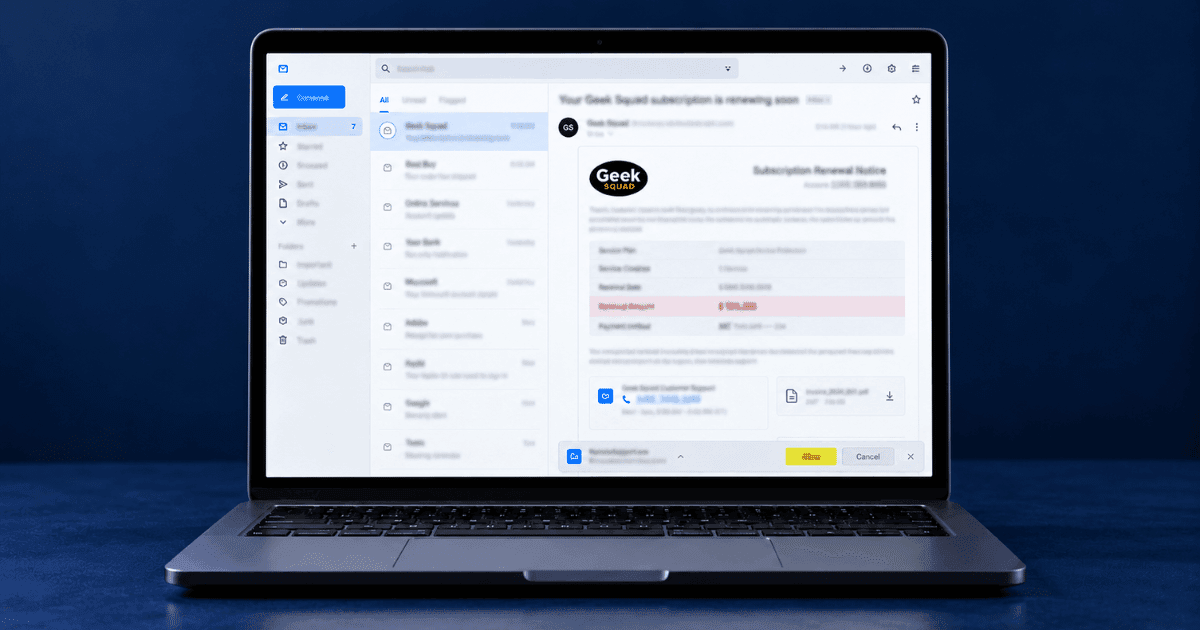
The Geek Squad scam is a widely distributed fraud that uses an unexpected invoice or subscription renewal notice to push recipients into calling a fake support number. Learning how to avoid Geek Squad scams starts with recognising that the message is designed to create urgency around a charge you do not remember authorising. Once you call, the person answering may request remote access to your device, ask you to open your bank account, or claim that a refund was issued incorrectly. The email may appear harmless, but calling the number, opening an unexpected attachment, or following the caller’s instructions can expose your device, accounts, and money. This guide explains what these messages look like, how the refund scheme works, and what to do if you have already called or shared information.
What a Fake Geek Squad Email Looks Like
A Geek Squad scam email usually resembles an automatic renewal confirmation or invoice for a technical support subscription. It may include a plausible order number, billing date, subscription description, and a charge ranging from a few hundred dollars to a much larger amount. Some versions place the invoice inside an image or PDF attachment, which can make the message appear more like a formal business document.
Instead of directing you to an account page, the email often displays a phone number beside instructions to call quickly if you did not authorise the charge. The unexpected payment and short deadline are intended to create urgency before you check your bank statement or contact the company independently.
Similar messages may use the names of Norton, PayPal, Amazon, or other recognised companies. The branding can change, but the underlying pattern is often the same: an unfamiliar charge, pressure to respond immediately, and contact information supplied inside the suspicious message. Do not use that number to verify the invoice. Check your actual account or bank statement through the official app or website instead.
How the Call Works and Creates Pressure
The Refund Offer
The person answering usually sounds calm, helpful, and familiar with customer-support procedures. They confirm that the unexpected charge can be cancelled and offer to issue a refund. This positions the caller as the solution rather than the source of the problem and makes the next instructions appear more credible.
Remote Access and the False Refund
The caller may claim that processing the refund requires access to your computer and ask you to install legitimate remote-access software. They may then tell you to open your online banking account to confirm that the refund has arrived. With access to the screen, they can view financial information and manipulate what appears in the browser.
The caller may create the impression that a much larger amount was transferred by mistake and ask you to return the difference. The displayed balance or transaction is manipulated, and no genuine overpayment has occurred. Any money you send through gift cards, a wire transfer, cryptocurrency, or another difficult-to-reverse method comes from your actual funds.
Why the Pressure Works
The scheme combines urgency, trust, and guilt. Calling may feel safer than clicking a suspicious link, while the supposed refund error makes you feel responsible for correcting someone else’s mistake. This emotional pressure can lead someone who would not normally send money to a stranger to act before checking the account independently. The US Federal Trade Commission provides further information on tech-support and refund scams, including how to report them.
How to Avoid Geek Squad Scams When the Email Arrives
Do not call the phone number or use any contact details provided in the message. If you want to confirm whether a charge exists, check your bank statement and account history independently. Access the company’s website by typing the official address yourself, using a saved bookmark, or opening its official app. These and other steps for avoiding online scams can help you verify unexpected messages without relying on the contact details they provide.
Do not reply to the email or open an unexpected attachment. Mark the message as spam or phishing, then delete it after confirming that you do not need to preserve it as evidence. If you opened an attachment, entered information, or allowed access to your device, take the additional security steps in the next section.
Receiving several similar messages may indicate that your email address is circulating through breached, exposed, or commercially available contact lists. It does not necessarily mean that your financial account has been accessed. If personal information may have been exposed, IdentityTheft.gov can provide a personalised recovery plan.
Need Expert Help?
Our team has resolved thousands of cases. Get confidential support now.
If You Already Called
Respond according to what happened during the call rather than spending time trying to determine whether the invoice was genuine.
If you installed remote-access software, disconnect the device from the internet, remove the software, and run a trusted security scan. Change important passwords from a different device, beginning with your email account.
If you opened online banking, contact your bank using the number printed on your card or shown in its official app. Explain that a caller had remote access while your account was open and ask the bank to review recent activity and secure the account.
If you sent money, contact the relevant bank, card issuer, gift-card company, payment service, or cryptocurrency exchange immediately. Provide the transaction details and ask whether a recall, dispute, freeze, or other recovery step is available.
In every case, check your email for unfamiliar forwarding rules, recovery addresses, active sessions, or security changes. If personal or financial information was exposed, the steps for reporting identity theft can help you document the incident and reduce further harm.
Reducing Future Attempts
Receiving a fake renewal message does not necessarily mean that an account has been compromised. Your email address may have been collected from a data breach, public profile, marketing list, or another source and then included in bulk scam campaigns.
Use a separate email address for financial accounts where practical, and avoid displaying that address publicly. Review which websites, profiles, and data-broker records connect your email address with your name, phone number, or previous addresses. Removing personal information from the internet can reduce the amount of data available for making future scam messages appear convincing.
Treat every unexpected invoice as a reason to check your own records rather than contact the sender. Open the company’s official app, type its website address independently, or use the phone number printed on your card or account statement. Do not rely on contact information supplied by the message that created the concern. Mark similar messages as spam or phishing, as this may help your email provider identify related campaigns and reduce how often they reach your inbox.
Frequently Asked Questions
The invoice has my real name. Does that mean they are inside my account?
Almost always it came from a data breach rather than from any account of yours. Names and email addresses circulate widely, and they are included precisely because the detail makes the invoice convincing.I called the number but gave no information. Am I fine?
Generally yes, if nothing was shared and nothing was installed. Confirming that your number is answered by a real person means more calls may follow, so treat later ones the same way.They talked me into remote access. What now?
Disconnect the device from the internet, then change the passwords for your email and banking from a different device, and enable two-factor authentication. Run a malware scan and contact your bank, since remote sessions are usually aimed at payments rather than files.Why Geek Squad specifically?
A widely recognised support brand makes an unexpected renewal plausible, and the refund story gives a reason to call. The brand is being used without involvement, which is why the real company's own channels are the only ones worth using.Should I reply to say I am not a customer?
No. A reply confirms the address is live and read. Mark it as phishing and check any charge directly through your bank.Taking Action Against Geek Squad Scams
Knowing how to avoid Geek Squad scams begins with treating every unexpected invoice as something to verify independently. Do not call the number in the message, open an unexpected attachment, or follow instructions from someone claiming to process a refund. Check your bank statement and account history through official channels, then mark the message as spam or phishing if no genuine charge exists.
If you already called, disconnect any remotely accessed device, contact your bank through an official number, change important passwords from another device, and review your email security settings. Preserve the message and transaction details if money or information was shared. If you need assistance documenting and reporting the incident, professional cybercrime complaint support can help you identify the appropriate next steps.
About the Author
Altahonos Team
The Altahonos Team consists of cybersecurity and online reputation management specialists with extensive experience in digital threat mitigation and content removal strategies, helping individuals and businesses protect their digital presence.
Related Resources
Trusted by Thousands

Based on 587+ verified reviews